Local AI: Easier Than You Think
You have a reason to run AI locally. You can afford the hardware.
You can operate the software. It's fast enough. And there are remarkably capable models available.
10 min read
Available on GitHub
The usual arguments for running AI locally are sovereignty and cost. But, at least for you and me, I think there's a more compelling one: protecting our competitive advantage. Your code, ideas, processes, experiments and mistakes are part of your professional or company's knowledge — and ultimately part of your company's moat. As AI becomes embedded in how we build businesses, it seems increasingly unwise to make everything that created that moat interlocked with someone else's AI.
This isn't to suggest that sending work to a cloud AI means the provider simply steals your ideas. But Microsoft CEO Satya Nadella has warned about AI becoming a mechanism for “enterprise value transfer”, while Palantir CEO Alex Karp argues that companies should protect their organizational and business intelligence — their “alpha.” Keeping an AI model on your own computer provides the simplest possible boundary: your work stays there.
And it's easier than you think. Let's dive in.
The “Big Computer” Myth
The first surprise is how little computer you actually need. I'm running 27B and 35B models at perfectly conversational speeds on a base M5 MacBook Pro with 32 GB of RAM, and at a prior job I was running similar models on a similar machine with just 24 GB of RAM — nice laptops, certainly, but hardly €10,000 AI workstations. The "B" in 27B simply means billions of parameters: roughly speaking, the numbers the model learned during training. Hugging Face, the main repository for open models, is full of models ranging from a few million parameters to hundreds of billions. For a laptop, models around 9B to 35B are particularly interesting: large enough to be remarkably capable, yet small enough to run locally.
The trick is quantization. Models are normally trained at much higher numerical precision than is necessary for inference, so their weights can be compressed — a 27B model at 4-bit quantization needs roughly 14 GB just for its weights, instead of about 54 GB at 16 bits. I generally use 4- or 5-bit models, trading a relatively small amount of accuracy for a dramatic reduction in memory and often better speed. You'll see these quantizations reflected in model names: 4bit or 5bit for MLX models, and names such as Q4_K_M or Q5_K_M for GGUF models — intimidating nomenclature that mostly amounts to different ways of saying “this is the compressed version.” Apple silicon also helps here: its unified memory is shared between the CPU and GPU, so most of that 32 GB can be available to the model rather than being limited by a separate pool of GPU memory. The result is that models which sound impossibly large can fit comfortably on a laptop you might already own.
But isn't 27B tiny compared with the frontier models? Yes, but — parameter count turns out to be a surprisingly poor proxy for intelligence. Architecture, training, distillation and reinforcement learning matter enormously: Qwen, for example, showed its 32B QwQ model matching or approaching the 671B DeepSeek-R1 on several reasoning benchmarks, while its later 4B Qwen3 could rival the previous-generation 72B Qwen2.5. In my own informal testing I'm getting better answers from Qwen 3.8 9B than from Qwen 3.6 35B-A3B. A model that is 20× smaller isn't 20× less capable — not even close.
The Complex Software Myth
If the hardware requirements are surprising, the software may be even more so. If you haven't done this before, let me suggest a quick start: download and install LM Studio. It provides a familiar graphical experience and has turned running an LLM locally into something decidedly mundane. From there you can browse and download models, run them, and even chat with them. Easy! With a single app you've completed the whole left stack of the following diagram.
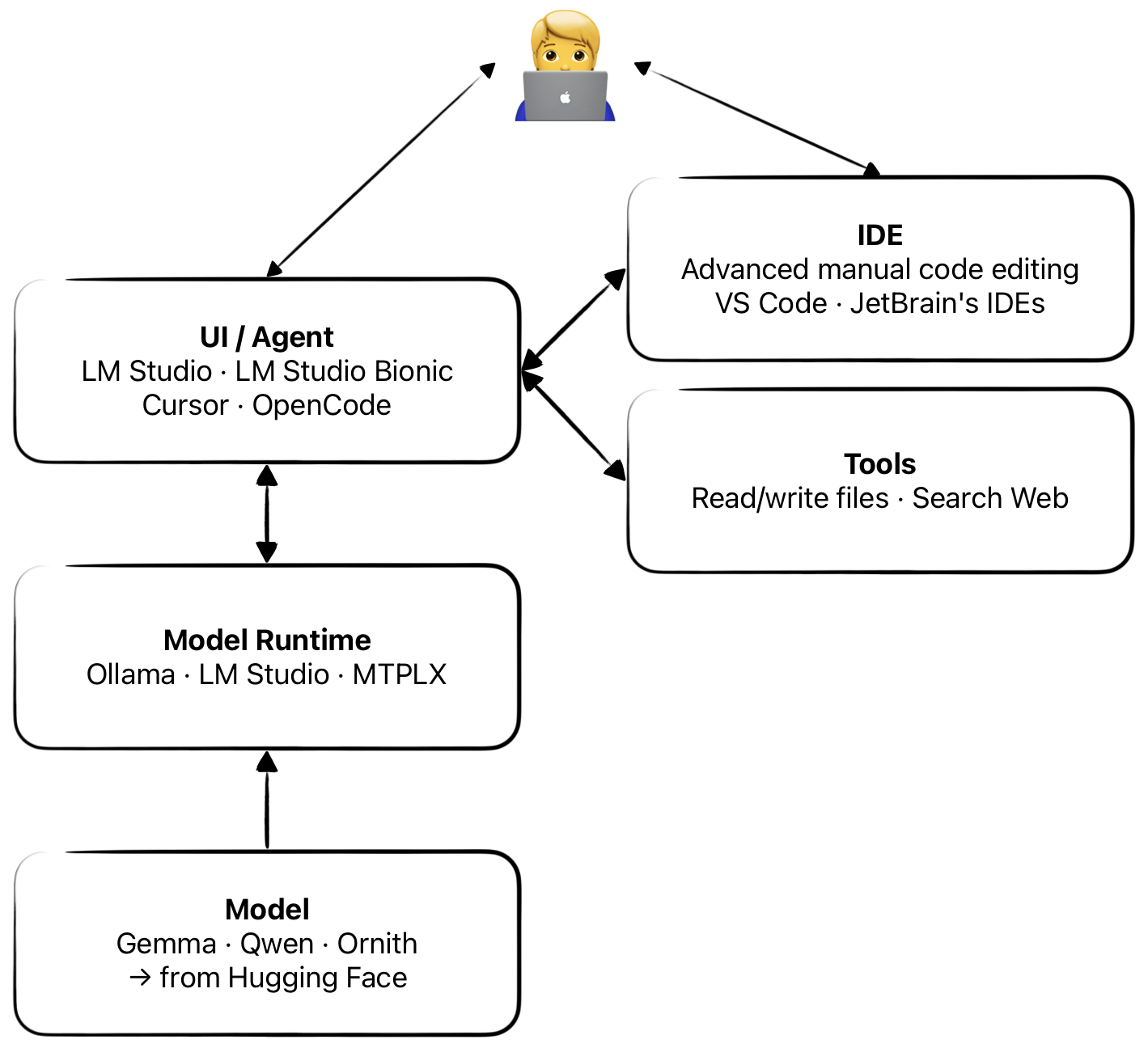
You may be disappointed after your first test: your local AI won't know about recent events, and unless you were lucky with your model pick, you may find it very slow. We'll address speed in the next section, but first we can make it more useful. Imagine a brain inside a jar, with no arms or legs. That's your AI at this point: you can talk to it, but it can't do much. For that, it needs tools. Installing them in LM Studio is easy, and I'd start with Karmakaze's DateTime and Altra's Web Search, both installable with a couple of clicks. There are many more — feel free to search and experiment.
Things change if you want to write code. You can do that from LM Studio, but I'd instead let it work as the Model Runtime, exposing an OpenAI-compatible local API for other software to use. I'd install OpenCode, an equivalent agent integration for your favourite IDE, or both. You'll need to edit OpenCode's configuration manually to point it at LM Studio. OpenCode is a terminal — or CLI — application, still a very common interface for coding agents. If you prefer a graphical interface, LM Studio Bionic or Cursor are good alternatives, or you can interact with the agent directly through your IDE's integration. Whichever route you choose, the architecture is much the same: LM Studio provides the brain; the agent does the work; and, when coding, your IDE can give you a comfortable place to inspect the results.
The Need for Speed
Not all 35B models require the computer to crunch through all 35 billion parameters for every token. A traditional dense model does roughly that; a Mixture of Experts (MoE) model divides its knowledge among specialized groups and activates only a few of them at a time. A model labelled 35B-A3B, for example, has around 35 billion parameters but activates roughly 3 billion for each token. That's dramatically less computation — and potentially much more speed. Don't mistake those 3B active parameters for the intelligence of a 3B model, though: well-designed MoE models routinely compete with much larger dense models in benchmarks. The trade-off for us is simpler: all 35 billion parameters still need to fit in memory.
Both dense and MoE models can be made even faster by exploiting a wonderfully simple idea: asking a large model “what comes next?” is expensive; asking it “are these next few tokens what you would have said?” is much cheaper. With speculative decoding, a smaller, faster model drafts several tokens ahead and the larger model verifies them in parallel, accepting the successful guesses until one fails, then correcting it and starting again. Multi-Token Prediction (MTP) takes a different approach: a model designed for it can predict several future tokens itself, which the main model can then verify efficiently. Unlike MoE, these techniques aren't about using a smaller fraction of the model's knowledge; they're ways of getting the full model to produce its answer more efficiently. The catch? Speculative decoding needs a compatible second model, while MTP needs a model and runtime specifically built to support it.
Finally, on a Mac I generally favour MLX models, optimized specifically for Apple silicon, over the more portable GGUF format — although neither is universally faster. And for MTP models, MTPLX is a particularly fast Mac-native option, replacing LM Studio for coding as the Model Runtime in my setup.
Choosing a Model
Now comes the fun part: which model do you download? Hugging Face is where much of the open-model world lives, and there are thousands to choose from. Some names will be familiar: Google publishes Gemma, OpenAI has its gpt-oss models, Europe's Mistral publishes dozens of coding and specialized models, while the Chinese Qwen and Kimi families have become particularly popular. Don't be intimidated by the endless variations: start with a recent model in the 9B–35B range, favour MoE models when available, look for a 4- or 5-bit quantization that fits your memory, and experiment. LM Studio's built-in search makes this considerably easier than browsing Hugging Face directly.
Two other features matter. Thinking models spend extra time reasoning before answering, which can pay off on difficult coding or reasoning problems; non-thinking models respond faster, and some models let you switch between the two. More importantly, look for tool support: without it, the model can't reliably use the web, manipulate files, run commands or operate as a coding agent. For both general chat and coding, I'd consider tool support essential.
The Staff Picks
After trying quite a few combinations, these are the models currently surviving on my Mac. This isn't a scientific benchmark: I gave each model the same small coding task and recorded its generation speed, elapsed time, token count, and whether the resulting code actually worked. It's a single prompt on a single computer, so don't read too much into the rankings — but it gives a useful sense of the very real differences you can expect between models.
| LLM | Thinking? | Runtime | Elapsed time | Tokens | Tok/s | Tests passed |
|---|---|---|---|---|---|---|
| Ornith 1.0 35B MTPLX | On | MTPLX | 5:26 | 15.3k | 47.4 | 28/33 |
| Qwen 3.8 27B Optimized Speed | On (Mid) | MTPLX | 10:05 | 7.7k | 12.8 | 29/33 |
| Qwen 3.6 35B A3B | Off | LM Studio | 0:50 | 2.2k | 48.1 | 24/33 |
| Qwen 3.8 9B | On (built-in) | LM Studio | 3:10 | 3.9k | 21.4 | Syntax errors |
| ChatGPT Medium | - | ChatGPT | 0:19 | ? | ? | 29/33 |
| Sonnet 5 Medium | - | Claude | 2:42 | ? | ? | 24/33 |
| Mistral Think | - | Le Chat | 0:58 | ? | ? | 24/33 |
See GitHub for full results.
For coding, my current pick is Ornith 1.0 35B MTP, running under MTPLX. It combines MoE and MTP, and in this test delivered 47.4 tok/s while producing working code. For general chat, I alternate between Qwen 3.6 35B-A3B and an unofficial Qwen 3.8 9B, both under LM Studio. These aren't benchmark winners I'm declaring on behalf of everyone — they're simply the models that have impressed me enough to keep using. The table also illustrates why tok/s alone isn't enough: the fastest model wasn't the most correct, while the most correct local model was dramatically slower.
Open models are improving at a ridiculous pace, so I'd expect both this table and my picks to age badly. That's perhaps the best reason to start experimenting yourself: the hardware is already on your desk, the software is free, and changing your AI can be as simple as downloading another file.